
A work hours calculator is a practical tool designed to help individuals and businesses track the number of hours worked over a specific period. Instead of manually calculating start times, end times, and breaks, this tool automates everything, reducing errors and saving time.
Whether you are a freelancer, employee, manager, or business owner, a work hours calculator ensures you always know how much time has been worked and how much should be paid.
Why a Work Hours Calculator Matters
Time tracking might seem simple, but small mistakes can lead to incorrect payroll, underpayment, or overpayment. A work hours calculator removes guesswork and delivers precise results instantly.
It becomes especially useful when dealing with multiple shifts, varying schedules, overtime rules, and break deductions. For professionals who bill hourly, accuracy directly affects income, making this tool essential rather than optional.
Key Features
Automatic Time Calculation
A work hours calculator instantly computes total working hours based on start and end times. It eliminates manual counting and ensures accurate results even when shifts cross midnight.
Break Time Deduction
Most tools allow users to input break durations, which are automatically subtracted from total hours. This feature is important for maintaining compliance with labor policies and ensuring fair calculations.
Overtime Tracking
Many calculators include overtime settings where users can define a threshold, such as 8 hours per day. Any extra hours are calculated separately, making payroll processing easier.
Multiple Day Entries
Advanced calculators allow users to add multiple days or shifts. This is ideal for weekly tracking, helping users see a complete overview of their working hours.
Currency and Pay Calculation
Some calculators go beyond time tracking and include pay estimation. By entering an hourly rate, users can instantly calculate total earnings, including overtime if applicable.
Mobile-Friendly Interface
Modern calculators are designed to work smoothly on mobile devices. This allows users to track hours on the go without needing a desktop.
How to Use a Work Hours Calculator
Step 1: Enter Start and End Time
Input the time you begin and finish work. The calculator will determine the total duration automatically.
Step 2: Add Break Duration
Enter any break time taken during the shift. The calculator subtracts this from the total hours.
Step 3: Set Hourly Rate (Optional)
If you want to calculate earnings, enter your hourly rate. This enables the tool to estimate your pay.
Step 4: Include Overtime Rules
Set the number of hours after which overtime applies. The calculator will separate regular and overtime hours.
Step 5: View Results
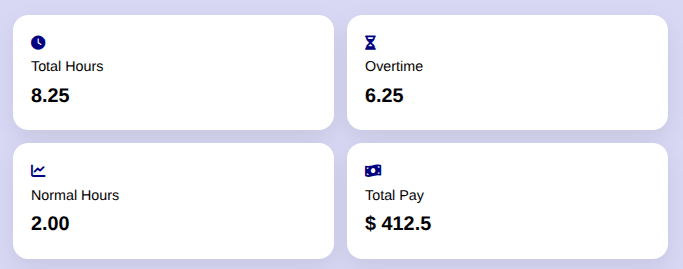
The tool displays total hours worked, overtime hours, and total pay in a clear format.
Who Should Use it?
Freelancers
Freelancers often work flexible hours and bill clients based on time. A work hours calculator helps track billable hours accurately and ensures proper invoicing.
Employees
Employees can verify their working hours and ensure they are paid correctly, especially when working shifts or overtime.
Managers and Employers
Managers can use the calculator to track employee hours, simplify payroll, and maintain accurate records without manual calculations.
Remote Workers
With remote work becoming common, tracking hours can be challenging. A calculator provides structure and clarity for remote professionals.
Benefits
Saves Time
Manual calculations can be slow and repetitive. A calculator provides instant results, allowing users to focus on more important tasks.
Reduces Errors
Human errors in time calculations are common. Automation ensures accuracy every time.
Improves Transparency
Both employees and employers can clearly see how hours are calculated, reducing disputes and confusion.
Simplifies Payroll
With built-in pay calculations, processing salaries becomes faster and more efficient.
Enhances Productivity
When time tracking is simple, users are more likely to stay consistent, leading to better time management and productivity.
Uses
Work hours calculators are used in various industries, including retail, healthcare, construction, and IT. Shift-based jobs benefit greatly from accurate tracking, while freelancers use them to manage multiple clients. Even students and part-time workers can use these tools to balance work and study schedules.
FAQs
A work hours calculator is used to track total working time, calculate overtime, and estimate earnings based on hourly rates. It simplifies time tracking and improves accuracy.
Yes, most work hours calculators allow you to set a threshold. Any hours beyond that limit are calculated separately as overtime.
Absolutely. Freelancers can track billable hours, calculate earnings, and maintain accurate records for invoicing and client communication.
Yes, a good work hours calculator can handle shifts that cross midnight, ensuring correct time calculations without manual adjustments.
No, most work hours calculators are web-based tools that work directly in your browser, making them easy to access on any device.
Wrap Up
A work hours calculator is a simple yet powerful tool that improves accuracy, saves time, and simplifies time tracking for everyone. Whether you are managing your own hours or handling a team, this tool ensures clarity and efficiency in every calculation.