
Understanding your exact age on a past date can be useful for many reasons, whether you are filling out forms, checking eligibility, or simply satisfying curiosity. This calculator makes the process fast, accurate, and effortless. You do not need to manually calculate years, months, or days. Just enter your details and get instant results.
How To Use How Old Was I Calculator?
Enter Your Date of Birth
Start by selecting your date of birth from the first input field. This is the most important step because all calculations are based on this date. Make sure you enter the correct day, month, and year to ensure accurate results.
Select the Past Date
Next, choose the specific date you want to calculate your age for. This could be any past date, such as a memorable event, a job start date, or an important milestone. The calculator will compare this date with your birth date.
Click on Calculate
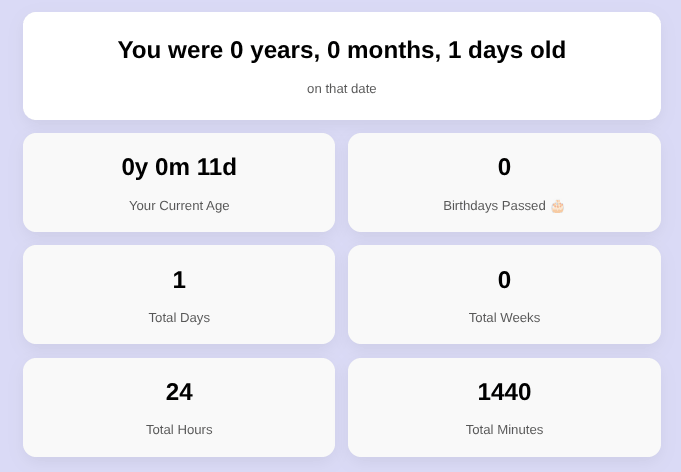
Once both dates are selected, click the “Calculate Age” button. The tool will instantly process the data and display your results in a clean and structured format.
Understanding the Results
Your Age on That Date
The main result shows your exact age in years, months, and days. It is displayed in a clear sentence format like “You were 17 years, 3 months, and 5 days old.” This makes the output easy to read and understand at a glance.
Your Current Age
In addition to your past age, the calculator also shows your current age. This gives you a quick comparison between your age now and your age on the selected date.
Birthdays Passed
You will also see how many birthdays you have completed by that date. This is a simple but engaging way to understand your age progression over time.
Detailed Time Breakdown
The calculator provides additional insights such as total days, weeks, hours, and minutes lived up to that date. These extra details make the tool more interesting and useful for users who want deeper insights.
Tips for Best Use
Always Double Check Dates
Even a small mistake in entering the date can change the result. Always verify your inputs before calculating.
Use for Multiple Scenarios
You can use this calculator for different purposes, such as academic forms, legal documents, or personal curiosity. Simply change the selected date and recalculate.
Works on All Devices
The calculator is designed to work smoothly on desktop, tablet, and mobile devices. You can access it anytime without any hassle.
Why Use This Calculator?
This tool saves time and removes the complexity of manual calculations. Instead of guessing or calculating mentally, you get precise and instant results. The clean design and detailed output also improve user experience, making it more engaging and reliable.
By following these simple steps, you can quickly find out exactly how old you were on any given date with complete accuracy.